
An expense tracker that keeps up with you
Add a purchase in a few taps, find any transaction later, and see where your money goes, without ads and without connecting your bank.
Coming soon to the App Store
iPhone and iPad · One email at launch, nothing else. Unsubscribe in one click.
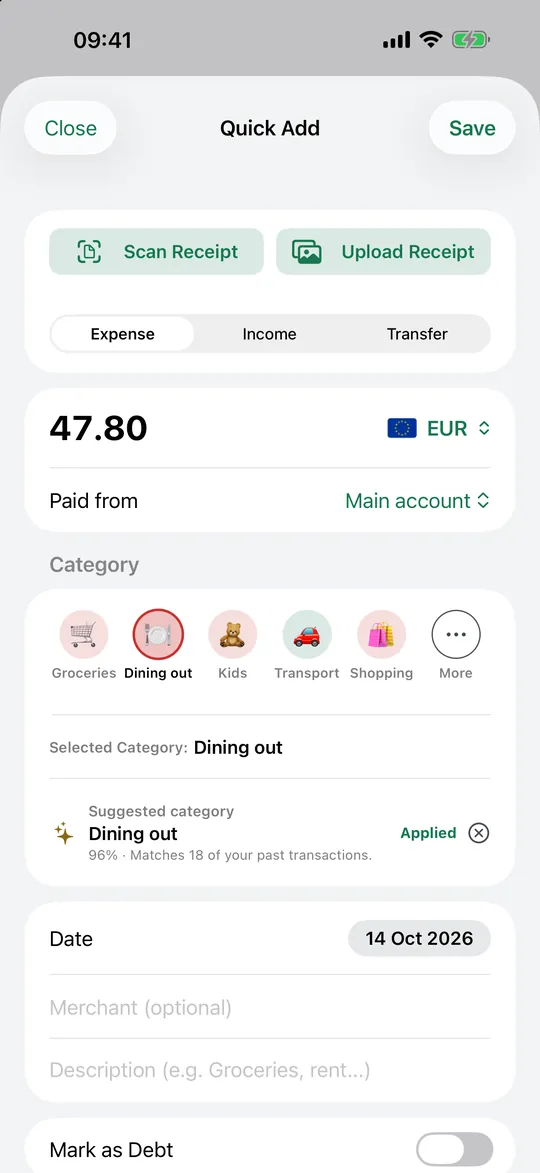
Quick Add: from purchase to transaction in a few taps
Enter the amount, pick the account and the category, and you are done. Financio suggests the category from your own past transactions and tells you how many it matched, so the second time is faster than the first.
Expenses, income and transfers between your own accounts all live in the same place, each with its date, merchant and note.
- Accounts such as checking, cash, credit card, savings and investments
- Categories and subcategories you define yourself
- Transfers that never count as spending or income
Find any transaction, any time
Every transaction is searchable and filterable by account, category, amount and period. With Premium the whole history is available offline too, so you can add and browse without a connection and let the app sync later.
- Search and filters by account, category, amount and period
- Add transactions offline and sync when you are back online (Premium)
- Search your transactions from the iPhone's own search (Premium)
Several currencies, handled properly
Keep each account in its own currency, see totals in the currency you prefer, and, with Premium, track a second currency alongside it with the exchange rate of the day recorded on each entry.
- A currency per account
- Totals converted at the rate of each day
- Entries typed in your second currency keep the original amount
Your data stays yours
Export everything as CSV whenever you want, import your history, and delete your account from Settings. There are no ads and no tracking.
Frequently asked questions
Is Financio a good expense tracker for iPhone?
Financio is built for iPhone and iPad. You add expenses and income by hand or by scanning a receipt, organise them into accounts and categories, and get budgets, reports and insights on top. It is free to start, and Premium unlocks the rest.
Do I have to connect my bank account?
No. You enter or scan transactions yourself, or import a CSV, so no bank login is involved.
Can I track expenses in more than one currency?
Yes. Each account can have its own currency, and Premium adds a second currency with daily conversion.
Keep exploring
Budget planner
Limits per category, a daily "left to spend" figure and savings goals that fill up on their own, in plain view on one screen.
Read more →Receipt scanner
Scan it, and the merchant, date, time and total are filled in for you. Every line is listed and checked against the total.
Read more →Spending insights
Most apps stop at charts. Financio reads your money for you: what changed, why, and what to look at first.
Read more →Understand your money, not just track it
Free to start, 14-day trial of everything Premium.
Coming soon to the App StoreiPhone and iPad · One email at launch, nothing else. Unsubscribe in one click.