
Never lose a receipt
Scan it, and the merchant, date, time and total are filled in for you. Every line is listed and checked against the total.
Coming soon to the App Store
iPhone and iPad · One email at launch, nothing else. Unsubscribe in one click.
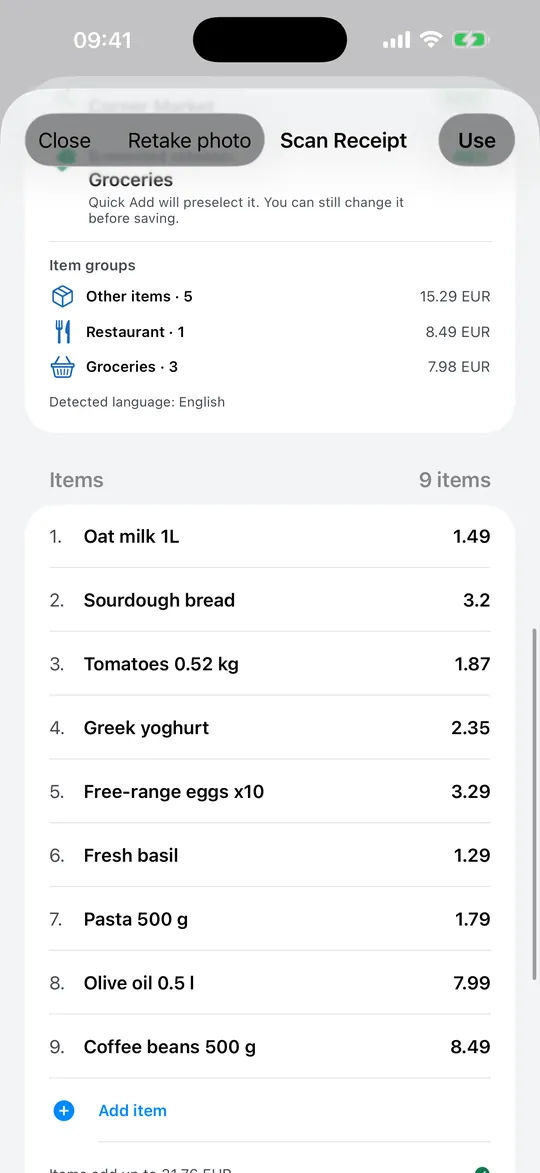
Text recognition that runs on your phone
Take a photo of a receipt or choose one from your photos. The text is recognised on your device, and only the figures you save become a transaction.
- Merchant, date, time and total read automatically
- Every line item listed and checked against the total
- Items grouped by category, so you can see what the shop was for
Check before you save
Financio tells you when a line looks doubtful, lets you edit any value and adds up the items so you can see at a glance that they match the total.
Keep the receipt with the transaction
If you turn it on, Financio keeps a private copy of the receipt attached to the transaction, and you can download all your receipts as an archive. It is a Premium feature and it is off until you switch it on.
- A private copy attached to each transaction (Premium)
- Download all receipts as an archive
- Off by default; you decide
Frequently asked questions
Does the receipt scanner work offline?
The text recognition runs on your device, so reading a receipt does not need a connection.
How many receipts can I scan for free?
The Standard plan includes 5 scans per month. Premium has no limit.
Are my receipt photos stored on a server?
Only if you turn on "Save digital receipts", which is off by default. Otherwise the photo is used to read the receipt and is not kept.
Keep exploring
Expense tracker
Add a purchase in a few taps, find any transaction later, and see where your money goes, without ads and without connecting your bank.
Read more →Private budget app
Your money is yours. Financio is built so that it does not need to know more than it must.
Read more →Budget planner
Limits per category, a daily "left to spend" figure and savings goals that fill up on their own, in plain view on one screen.
Read more →Understand your money, not just track it
Free to start, 14-day trial of everything Premium.
Coming soon to the App StoreiPhone and iPad · One email at launch, nothing else. Unsubscribe in one click.